Discover how Procreate empowers artists & creators on iPad with customizable brushes, animation tools, and professional workflows. Perfect for digital art beginners to pros!
Procreate is reshaping the world of digital art, becoming an essential tool for creators of all kinds. This powerful app offers a wide range of features, allowing users to create stunning illustrations, paintings, and sketches directly on their iPads. Entrepreneurs are using it to design brands, while hobbyists find joy in exploring their artistic side. But what exactly makes Procreate so special? What unique tools does it offer, and how does it perform under different creative situations? In the following sections, we’ll delve into Procreate’s features, its user-friendly interface, how it integrates with artistic workflows, and tips for maximizing your experience. Whether you’re a seasoned professional or an enthusiastic beginner, there’s something about Procreate that captures the imagination.
Features that inspire creativity
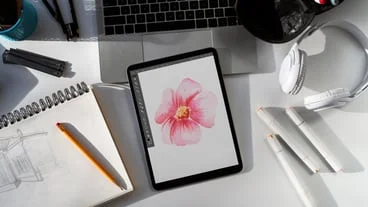
One of Procreate’s standout features is its remarkable versatility. The app includes hundreds of brushes, customizable to suit your style or project needs. From sketching to painting, each brush mimics real-life tools, creating a natural flow in the creative process. For instance, the watercolor brush mimics paint blending for an authentic artistic look.
In addition to brushes, Procreate includes advanced tools like layering, blending modes, and the ability to create animations. This versatility opens doors to new possibilities. For example, users can animate a character coming to life through a fun and intuitive frame-by-frame method.
Moreover, the app allows for a high level of customization. Artists can create their own brushes and import them, tailoring the experience to fit their unique needs. This feature is popular among graphic designers who require specialized tools for their projects. Many creators share their unique brushes online, fostering a community that encourages collaboration and innovation.
User-friendly interface and accessibility
Procreate is renowned for its intuitive interface, which makes it easy for users of all skill levels to navigate. The learning curve is gentle, thanks to a clean design that prioritizes the user experience. Features are organized logically, so new users can quickly familiarize themselves with core functions.
A unique aspect of this app is its accessibility for everyone— from children learning to draw to professional illustrators. Users can pinch to zoom, easily switch colors, and undo mistakes with a simple swipe. The tap-and-hold feature allows users to clean up their lines, making drawing smoother and more precise. When learning the ropes, creators can take advantage of Procreate’s tutorial library. Productive engagement becomes richer with the guidance of visual aids, offering a supportive learning process.
Even the price point contributes to accessibility. Compared to traditional art supplies like paint and canvases, Procreate offers a one-time fee, allowing users to dive into art without breaking the bank.
Integration with established workflows
For those already embedded in the digital creative ecosystem, Procreate offers numerous integrations. The app functions seamlessly with popular platforms like Adobe Photoshop, giving users the ability to export and import files with ease.
This ability is particularly beneficial for illustrators transitioning to digital space. For examples, artists can sketch in Procreate and then refine their work in Photoshop, leveraging the strengths of both applications. As a result, users can blend Procreate’s fluid drawing capabilities with Photoshop’s extensive editing tools.
Furthermore, Procreate’s platform integrates well with various hardware. The Apple Pencil, a defining accessory for the iPad, pairs beautifully with the app, offering pressure sensitivity and tilt functions that provide an authentic drawing experience. Creatives have mentioned that combining the Apple Pencil with Procreate has revolutionized their ability to sketch on the go, capturing inspiration anytime and anywhere.
Communities and resources for growth
As more creators adopt Procreate, a vibrant community has emerged. Social media platforms such as Instagram and TikTok showcase endless Procreate artwork, tutorials, and challenges. This visibility encourages users to explore their creativity and share their progress, fostering a sense of camaraderie among digital artists.
Artists can connect through platforms like YouTube, where numerous instructional videos help users maximize Procreate’s potential. Tutorials range from simple brush techniques to advanced animation tricks. Additionally, forums such as Reddit provide spaces for creators to discuss ideas, share artwork, and offer feedback.
The community aspect extends to professional growth as well. Artists collaborate on projects and share brushes or textures, enriching the digital art landscape. Many skilled creators even offer paid courses or workshops to help newcomers with their artistic journeys, providing structured pathways for improvement.
Tips for unlocking creative potential
To make the most of Procreate, consider exploring its lesser-known features. For example, experiment with the QuickMenu feature to customize your shortcuts. Keep commonly used tools at your fingertips, streamlining your workflow significantly.
Don’t overlook the various brush settings that can dramatically alter your drawing experience. Adjusting settings like brush size and opacity gives you greater control, allowing for intricate designs or simple sketches. Additionally, embracing the layer capabilities can lead to refined artwork. Create separate layers for different elements, and make mistakes without the fear of compromising your entire piece.
Also, practice is key. Set aside regular time for experimentation and creation, and don’t hesitate to join challenges that inspire you to broaden your horizon. Procreate’s gallery feature serves as a motivational space to track your progress, showcasing improvements over time. Self-competition can ignite creativity, and Procreate’s community can help sustain momentum.
Procreate stands out in the world of digital art due to its powerful features, user-friendly design, and the active community of creators supporting its growth. Its accessibility and integration with other tools make it a valuable asset for both aspiring and experienced artists. Taking the time to engage with the app’s functionalities and community can enhance your artistic journey, turning ideas into captivating creations. By understanding and utilizing Procreate’s potential, users can experience a transformation in how they create, share, and connect through art. Whether you’re sketching a quick idea or exploring a vast canvas, Procreate empowers creativity like never before.